




AC Troubleshooting Tips Before Calling a Pro in Northern Utah
If you’re searching for ac troubleshooting tips before calling a pro, here’s a quick-reference list of the most effective steps to try first:
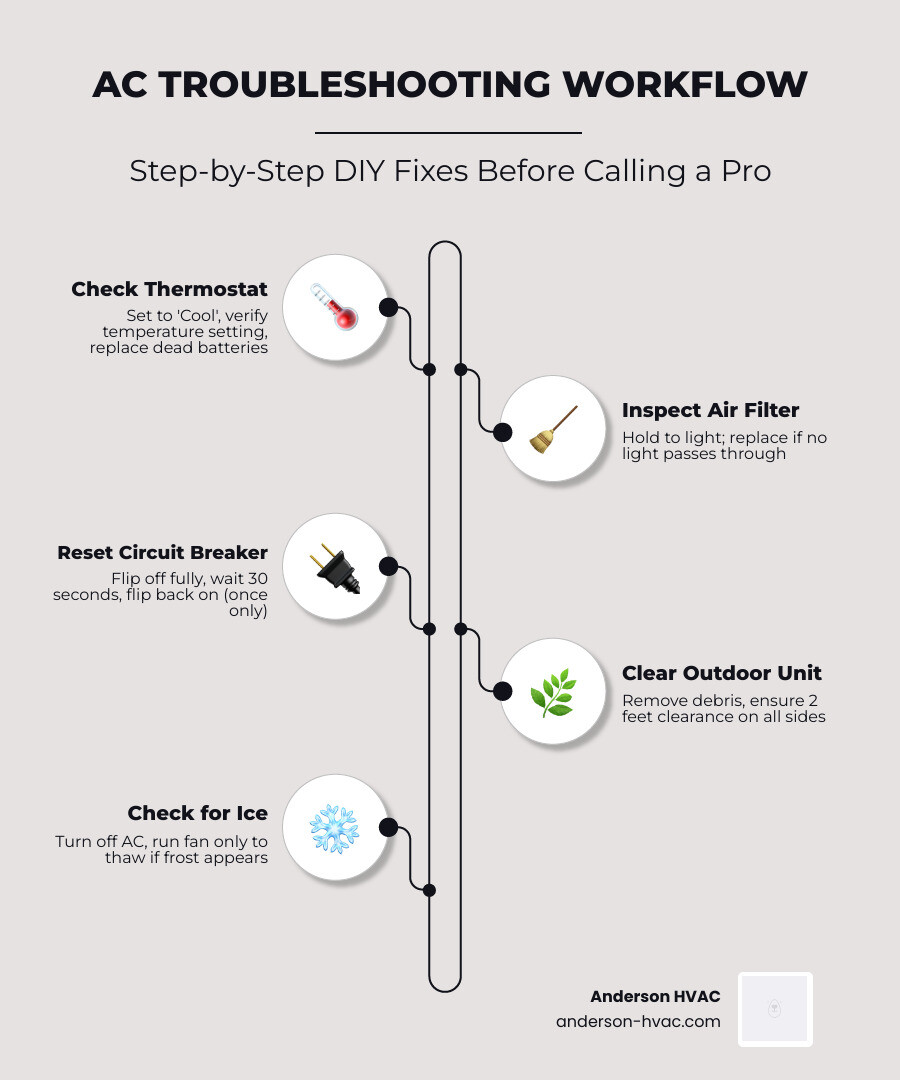
- Check the thermostat – Make sure it’s set to “Cool,” the temperature is below room temp, and the batteries aren’t dead.
- Inspect the air filter – Hold it up to light. If no light passes through, replace it immediately.
- Reset the circuit breaker – Flip it fully off, wait 30 seconds, then flip it back on. Do this only once.
- Check the outdoor disconnect switch – It may have been accidentally bumped during yard work.
- Clear debris around the outdoor unit – Maintain at least 2 feet of clearance on all sides.
- Look for ice on the refrigerant lines or indoor coil – If you see frost, turn the system off and run the fan only to thaw it.
- Check the condensate drain line – Standing water near the indoor unit may mean a clog triggered a safety shutoff.
It’s the hottest afternoon of the summer in North Ogden, and your AC just quit. Before you reach for the phone, take a breath — because a surprising number of “broken” air conditioners in Northern Utah turn out to have a dead thermostat battery, a clogged filter, or a tripped breaker. In fact, some HVAC professionals estimate that close to 9 out of 10 service calls for underperforming central AC units come back to a single dirty filter. That’s a fixable problem you could solve in five minutes for almost nothing.
This guide walks you through the smart, safe steps every homeowner should try before calling in a technician — and makes it clear exactly where the DIY line ends and the professional territory begins.
Common Reasons for Cooling Failures
When your home starts feeling more like a sauna than a sanctuary, it’s usually due to one of a few common culprits. Understanding these can help you apply the right ac troubleshooting tips before calling a pro.
- Restricted Airflow: This is the most frequent cause of system issues. When air can’t move through your system, the heat exchange process fails. This is almost always caused by a dirty air filter.
- Thermostat Malfunctions: Sometimes the “brain” of your system just needs a reboot or a fresh set of batteries.
- Power Supply Interruptions: From a tripped breaker in your main panel to a flipped disconnect switch outside, power issues can stop a system in its tracks.
- Mechanical Wear and Tear: While the average HVAC lifespan is 15 to 20 years, frequent minor breakdowns typically begin appearing by year 12. If your system is approaching its second decade, it may be struggling with aging motors or failing capacitors.
- Ductwork Issues: According to the Department of Energy, about 30% of the energy in ducted systems is lost due to leaks or poor layout. If your unit is running but specific rooms stay hot, you might have a disconnected or kinked flexible duct in the attic.
To prevent these issues from ruining your summer, you can read more about how to Dont Lose Your Cool With Farmington Ac Repair.
Essential AC Troubleshooting Tips Before Calling a Pro
Before you assume you need a total system replacement, use this diagnostic table to narrow down the problem.
| Symptom | Potential Cause | Quick DIY Check |
|---|---|---|
| No Power/Unit Won’t Start | Thermostat, Breaker, or Float Switch | Check batteries, reset breaker once, check drain pan for water. |
| Blowing Warm Air | Clogged Filter or Dirty Outdoor Unit | Replace filter, hose down outdoor coils, check thermostat mode. |
| Weak Airflow | Filter or Blocked Vents | Inspect filter, ensure all registers are open and unobstructed. |
| Strange Noises | Loose Parts or Failing Motor | Tighten visible screws on panels; shut off if grinding occurs. |
| Ice on Unit | Airflow Restriction or Low Refrigerant | Turn off AC, run “Fan Only” for 2-4 hours, replace filter. |
One important thing to remember is the 20-degree rule. On average, there is a 20-degree temperature difference between the inside of a property and the outside environment. If it is 100 degrees in Layton or Syracuse, your AC might struggle to get the house below 80 degrees. This isn’t necessarily a “broken” unit; it’s just physics.
Performing a visual inspection is your first line of defense. Look for frayed wires, ice buildup, or pools of water. If you want to keep your system running efficiently without breaking the bank, check out Brigham City Ac Repair Keeping Your Home Chilled And Your Wallet Full.
Common Tools for Basic Maintenance:
- A fresh air filter (matched to your unit’s size).
- A screwdriver (to tighten loose panels).
- A garden hose (for gentle cleaning).
- A wet/dry vacuum (to clear drain lines).
- Fresh AA or AAA batteries.
Thermostat Troubleshooting Tips Before Calling a Pro
The thermostat is the control center for your comfort, but it’s also a common source of “false alarms.”
- Battery Power: If your display is blank or dim, replace the batteries immediately. Some smart thermostats may even require a full 60-second reboot after a battery change to clear software glitches.
- Mode Verification: Ensure it is actually set to “Cool.” It sounds simple, but a family member might have accidentally switched it to “Heat” or “Fan Only.”
- Fan Settings: Set your fan to “Auto” rather than “On.” In the “On” position, the blower runs constantly, even when the cooling cycle is off, which can blow humid, lukewarm air back into your rooms.
- Direct Sunlight: If your thermostat is on a wall that receives direct afternoon sun, it will register a higher temperature than the rest of the house, causing the unit to overwork.
- Dust Accumulation: Gently wipe the sensor clean. Dust can insulate the sensor and cause incorrect readings.
For those using specialized systems, our Your Harrisville Ductless Air Conditioning Repair Roadmap offers specific advice for mini-split units.
Airflow and Filter AC Troubleshooting Tips Before Calling a Pro
A clogged filter is the #1 enemy of your AC. It restricts airflow, which can cause the evaporator coil to freeze and the compressor to overheat.
- Replacement Intervals: 1-inch filters should be changed every 30 to 90 days. If you have a 4-inch or 5-inch media filter, these can often last 6 to 12 months.
- The Light Test: Not sure if it’s dirty? Hold the filter up to a light source. If you can’t see light passing through the fibers, it’s time for a new one.
- Vent Obstructions: Ensure furniture, rugs, or curtains aren’t blocking your return or supply vents. This creates pressure imbalances that can lead to long-term mechanical damage.
- Duct Integrity: If you’re in Clearfield and notice a sudden drop in air quality, it could be a duct issue. Learn more about Ac Repair In Clearfield Ut A Breath Of Fresh Air For Your Car And Home.
For more advanced filtration needs, visit our page on filtration services.
Power, Drainage, and Outdoor Maintenance
If the airflow is fine but the unit won’t kick on, it’s time to check the power and drainage systems.
- Circuit Breakers: Check your home’s main electrical panel. If the AC breaker has tripped, flip it completely to “Off” and then back to “On.” Safety Tip: Stand to the side of the breaker box, not directly in front of it, when resetting a breaker. If it trips again immediately, do not try a second time—this indicates a serious electrical fault.
- Outdoor Disconnect: Near your outdoor condenser unit, there is a small box containing a disconnect switch. This can be accidentally bumped into the “Off” position during yard work or by children playing.
- Condensate Drain Clogs: Your AC removes moisture from the air. This water drains through a PVC pipe. If this pipe clogs (often with algae or “sludge”), a safety float switch will trigger, cutting power to the system to prevent water damage.
- The Vinegar Flush: To prevent clogs, pour a cup of white vinegar down the condensate drain line once a year. If it’s already clogged, you can use a wet/dry vacuum on the outdoor end of the pipe to pull the blockage through.
- Outdoor Unit Care: Your condenser needs to “breathe” to release heat. Maintain at least 2 feet of clearance from plants, shrubs, and debris. Use a garden hose to gently rinse the fins from top to bottom. Never use a pressure washer, as it will flatten the delicate metal fins and ruin the unit.
If you’re dealing with a ductless system in Clinton, see our guide on How To Fix Your Clinton Homes Ductless Ac Without Losing Your Cool.
When to Stop DIY and Call the Experts
While we love a proactive homeowner, some issues are dangerous or require specialized tools. Knowing when to stop is a key part of ac troubleshooting tips before calling a pro.
- Frozen Coils: If you see frost on the copper lines or the indoor evaporator coil, turn the system off immediately. This is often caused by low refrigerant or severe airflow restriction. Running a frozen system can destroy the compressor.
- Refrigerant Leaks: If you hear a hissing sound or see oily residue around the refrigerant lines, you likely have a leak. Handling refrigerant requires EPA Section 608 certification. It is illegal and hazardous for a non-pro to attempt these repairs.
- Strange Noises:
- Grinding/Screeching: Often indicates worn motor bearings or a failing blower fan.
- Clicking: Usually points to a bad capacitor or an electrical relay issue.
- Banging: Could mean a loose part is hitting the fan blades.
- Electrical Smells: If you smell burning plastic or a “sulfur” odor, shut the power off at the breaker and call us immediately. This indicates shorted wiring.
- Compressor Issues: A healthy central AC compressor typically draws between 8 to 10 amps. Anything above that often indicates failing capacitors or motors, which require professional diagnostic equipment to verify.
If you are seeing these signs, it’s time to understand Why Your Kaysville Home Needs Professional Ductless Ac Repair Right Now. For ongoing peace of mind, consider our professional maintenance plans.
Frequently Asked Questions about AC Troubleshooting
Why is my AC running but not blowing cold air?
The most common causes are a dirty air filter, a dirty outdoor condenser coil, or low refrigerant levels. Start by replacing the filter and cleaning the outdoor unit. If the air is still warm, the system may have a refrigerant leak or a failing compressor.
How often should I change my air filters in Northern Utah?
In areas like North Ogden and Layton, we recommend checking your 1-inch filters every 30 days during the peak summer and winter months. If you have pets or allergies, monthly changes are essential. Standard 4-inch media filters should be replaced every 6 to 12 months.
What should I do if I see ice on my outdoor AC unit?
Turn the AC off at the thermostat immediately. Set the thermostat to “Fan Only” or “Fan On” for 2 to 4 hours. This allows the blower to move warm air over the coils to thaw the ice without running the compressor. Once thawed, replace your air filter. If it freezes again, call a professional to check your refrigerant levels.
Conclusion
At Anderson HVAC, we’ve been part of the North Ogden community for over 40 years. We know that a broken AC is more than just an inconvenience; it’s a disruption to your family’s comfort and safety. As a family-owned and operated business, we take pride in providing personalized, neighborly service that treats your home like our own.
While these ac troubleshooting tips before calling a pro can save you time and a service fee, some problems require the steady hand of an expert. Whether you are in Brigham City, Kaysville, or anywhere in Northern Utah, we are here to ensure your system runs efficiently and reliably.
Don’t spend another minute in the heat. Schedule your professional AC repair in North Ogden today and experience the difference that 40 years of expertise can make.